Huzzah! Windows 7 has finally been installed. It's been a comedy of errors for me, but I'm still going to put most of the blame on Microsoft.
I resolved my power problem by throwing money at it, by purchasing a Corsair VX 550W PSU, approximately a month ago. The PSU is great and I've seen a much stabler machine. So why didn't I have Windows 7 installed immediately after that?
I tried, I really did. However, the DVD was corrupt and then I lost the image in order to make another one. Besides, that image seemed dodgy, so I asked a friend to download a proper image from TechNet. I have a subscription, but no bandwidth. He tried, he really did. It took three attempts to download as the connection kept being interrupted. And did TechNet resume from where the download was before the interruptions? You know the answer.
Anyhow, I finally got hold of that image yesterday and here we are. All futurised.
I've also decided to give Panda's Cloud Antivirus a try. I'll report on that shortly...
Sunday, December 27, 2009


Friday, November 20, 2009
Office 2010 Beta
Having failed hopelessly in my attempts to setup Windows 7 (all blame to be directed at my pathetic PSU), I thought I'd go with the much simpler to install and review Office 2010 Beta. The beta is available as a free download here.
Installation
This was fairly slow, and Office has ramped up in size to use 2.34GB in total. Not too bad, but on my work laptop I'm a little short on space. They've made it really easy this time to actually install along side your existing (read: safe) version of Office, or upgrade it if you want to. Seriously, don't upgrade yet, its a beta for a reason. The installation has the awesome affect of making your task bar disappear. Kindly, it is returned after about 5 minutes. I hope that one's on the issue list.
The install appeared to finish, so I tried to access the programs. However it had actually not finished and got quite grumpy.
Word, homey
Once it had finished being grumpy it finally asked me to be restarted. Begrudgingly I obliged. On finally excitedly opening up Word, the splash screen appears and *crash*. The "Send to Bluetooth" feature crashed on load. On second opening of Word, it asked me if I wanted to disable the feature, which is a significant improvement for Microsoft over their "keep trying, its you thats the problem not us" approach.
For some unknown stupid reason, Microsoft have chosen to set the default appearance to the "silver" theme. This has the effect of making Word look like Open Office. Now, I'm all for a bit of open source, in fact I hugely respect it, and understand when it looks like a Romanian gypsy's dog's arse. But I dont expect the same of proprietary software. Not least of all Word 2010. Changing to the "blue" theme really helps with this. Microsoft, pick a new default!

So, as you can see they've gotten rid of that ridiculous round windows button, and brought back a familiar favourite, File. They've spent some time considerably improving the access to the features under file, which is a big plus for me due to work requirements.
Out-WTF-look
Outlook very kindly changed itself to be the default mail client. Now I would love and have begged to be able to use Outlook and Exchange, but until further notice I'm stuck with Lotus Notes. Microsoft, don't change the default when I don't ask you to. Naughty.
Excel at what exactly?
Other than the additional of File, excel remains seeminly largely unchanged. The marketing blurb speaks of new conditional formatting. New? Seriously new? The writer must be new to the marketing department. Perhaps they should open up Excel 2007 and have a look closely, seems pretty much the same to me.
Roundup
Other than some bug fixes and behind the scene's work, this is pretty much a bog standard release of Office. It's an uglier version of 2007, with minor improvements. However, there's one small thing about this beta for which Microsoft deserves a bravo (or rather a cry of "finally!"):
 The two smiley's represent a feedback capturing system. If you like something that you see in the new office, click the happy smiley, and a screen shot of what it is you like is taken. Add some comments about why you like, and send to Microsoft. Ofcourse the same applies to stuff you don't. Three cheers to finally garnering user feedback in a friendly way. Huzzah!
Installation
This was fairly slow, and Office has ramped up in size to use 2.34GB in total. Not too bad, but on my work laptop I'm a little short on space. They've made it really easy this time to actually install along side your existing (read: safe) version of Office, or upgrade it if you want to. Seriously, don't upgrade yet, its a beta for a reason. The installation has the awesome affect of making your task bar disappear. Kindly, it is returned after about 5 minutes. I hope that one's on the issue list.
The install appeared to finish, so I tried to access the programs. However it had actually not finished and got quite grumpy.
Word, homey
Once it had finished being grumpy it finally asked me to be restarted. Begrudgingly I obliged. On finally excitedly opening up Word, the splash screen appears and *crash*. The "Send to Bluetooth" feature crashed on load. On second opening of Word, it asked me if I wanted to disable the feature, which is a significant improvement for Microsoft over their "keep trying, its you thats the problem not us" approach.
For some unknown stupid reason, Microsoft have chosen to set the default appearance to the "silver" theme. This has the effect of making Word look like Open Office. Now, I'm all for a bit of open source, in fact I hugely respect it, and understand when it looks like a Romanian gypsy's dog's arse. But I dont expect the same of proprietary software. Not least of all Word 2010. Changing to the "blue" theme really helps with this. Microsoft, pick a new default!

So, as you can see they've gotten rid of that ridiculous round windows button, and brought back a familiar favourite, File. They've spent some time considerably improving the access to the features under file, which is a big plus for me due to work requirements.
Out-WTF-look
Outlook very kindly changed itself to be the default mail client. Now I would love and have begged to be able to use Outlook and Exchange, but until further notice I'm stuck with Lotus Notes. Microsoft, don't change the default when I don't ask you to. Naughty.
Excel at what exactly?
Other than the additional of File, excel remains seeminly largely unchanged. The marketing blurb speaks of new conditional formatting. New? Seriously new? The writer must be new to the marketing department. Perhaps they should open up Excel 2007 and have a look closely, seems pretty much the same to me.
Roundup
Other than some bug fixes and behind the scene's work, this is pretty much a bog standard release of Office. It's an uglier version of 2007, with minor improvements. However, there's one small thing about this beta for which Microsoft deserves a bravo (or rather a cry of "finally!"):
 The two smiley's represent a feedback capturing system. If you like something that you see in the new office, click the happy smiley, and a screen shot of what it is you like is taken. Add some comments about why you like, and send to Microsoft. Ofcourse the same applies to stuff you don't. Three cheers to finally garnering user feedback in a friendly way. Huzzah!
Sunday, November 8, 2009
Windows Sucken
I've just eagerly got hold my copy of Windows 7 Ultimate (x64) and key from TechNet and now I'm going through the fun of trying to install it. I thought this was supposed to be a simpler process than Vista, but so far it's been hell.
First problem:
It looks like my Asus P5K SE/EPU motherboard drivers haven't been updated for Windows 7. So I'll be off to Intel to get the chipset drivers then...
Second problem:
It took forever to actually get to the setup screen. I'd been told this is a common issue, so I wasn't too concerned. When it eventually got here, I chose to do a custom install as I wanted to format the partition (leaving no trace of Windows 6, so that Windows 6.1, sorry 7 :P, wasn't held back by it in any way). Like Vista, you've only got the option to do the ridiculously inadequate lightning quick format. It does that, moves on with the setup (while taking forever to get to the next screen). Eventually, at about 15% into it, I'm told that something's corrupt and good day to you sir.
On second attempt, the same happens. Getting some advice, I was told to use a familiar friend to format properly. What friend was this I hear you ask...

Third problem: And this one I can't gleefully place on Microsoft. My admittedly pathetic 400W power supply has finally caved in, as the nVidia 8800 Ultra is killing it, causing it to randomly restart all during the install. Now, as I'd like to keep my HDD, my Windows 7 saga will have to wait until I get a new psu...
First problem:
It looks like my Asus P5K SE/EPU motherboard drivers haven't been updated for Windows 7. So I'll be off to Intel to get the chipset drivers then...
Second problem:
It took forever to actually get to the setup screen. I'd been told this is a common issue, so I wasn't too concerned. When it eventually got here, I chose to do a custom install as I wanted to format the partition (leaving no trace of Windows 6, so that Windows 6.1, sorry 7 :P, wasn't held back by it in any way). Like Vista, you've only got the option to do the ridiculously inadequate lightning quick format. It does that, moves on with the setup (while taking forever to get to the next screen). Eventually, at about 15% into it, I'm told that something's corrupt and good day to you sir.
On second attempt, the same happens. Getting some advice, I was told to use a familiar friend to format properly. What friend was this I hear you ask...

Third problem: And this one I can't gleefully place on Microsoft. My admittedly pathetic 400W power supply has finally caved in, as the nVidia 8800 Ultra is killing it, causing it to randomly restart all during the install. Now, as I'd like to keep my HDD, my Windows 7 saga will have to wait until I get a new psu...
Monday, October 12, 2009
Reverse Engineering Database Diagrams in Visio
This little one fools me every now and then, and it's one of those cases where I always say... crap, I know how to resolve this, how did I do it last time??
I find reverse engineering the database to Visio quite useful, particularly if you're unfamiliar with a new schema, as it's a great way to easily see the relationships between tables. And it's a whole lot better than the abomination that is the generated database diagram in SQL Server.
To get started, create a new Database Model Diagram in Visio. You'll see on the menu bar that you get a Database option, and the first item is Reverse Engineer.
In the wizard that pops up, one of the installed Visio drivers should be Microsoft SQL Server. Select this from the drop down, then click on New... to create a new datasource. You'll need to do this for each database that you want to connect to. For SQL Server database, generally you'll select "User Data Source" and the "SQL Server" or "SQL Native Client" driver over the next two screens.
On the next screen, give your data source a name and choose the server. It's important to get this bit right, and if you're connecting to a named instance, to select the name. Otherwise when you try to connect on the next screen (using your prefered choice of authentication), you'll get an error similar to the one below.
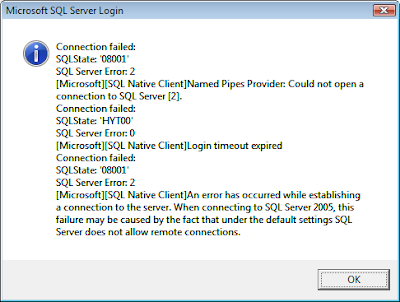
Now that one at least gives you a clue. Sometimes you'll be given an error like "SQL Server does not exist or access denied", so look out for that.
I find reverse engineering the database to Visio quite useful, particularly if you're unfamiliar with a new schema, as it's a great way to easily see the relationships between tables. And it's a whole lot better than the abomination that is the generated database diagram in SQL Server.
To get started, create a new Database Model Diagram in Visio. You'll see on the menu bar that you get a Database option, and the first item is Reverse Engineer.
In the wizard that pops up, one of the installed Visio drivers should be Microsoft SQL Server. Select this from the drop down, then click on New... to create a new datasource. You'll need to do this for each database that you want to connect to. For SQL Server database, generally you'll select "User Data Source" and the "SQL Server" or "SQL Native Client" driver over the next two screens.
On the next screen, give your data source a name and choose the server. It's important to get this bit right, and if you're connecting to a named instance, to select the name. Otherwise when you try to connect on the next screen (using your prefered choice of authentication), you'll get an error similar to the one below.

Now that one at least gives you a clue. Sometimes you'll be given an error like "SQL Server does not exist or access denied", so look out for that.
Sunday, July 19, 2009
I'd rather have some policy, thanks
The ruling poltical party in SA, the ANC, suffered a rather embarrassing defacement to their website over this weekend. After the usual party propaganda, there was this little gem:

Let's zoom in on that a bit:

That's right. Jet charters. Government porn. A personal request of JZ perhaps?

Let's zoom in on that a bit:

That's right. Jet charters. Government porn. A personal request of JZ perhaps?
According to the report, they can't sort this out until Monday. Now, I understand the annoyance of working over the weekends (hence the recent lack of posts myself), but I'd call in my developers if I found this on my site.
Now let's assume for this minute this wasn't a deliberate attack - which is a fair assumption considering in the top right corner the site is listed as last updated today. This raises questions of the character of the deleveopment team that the government actually hires to design their websites, if they actually allow this to enter production.
This got me thinking though, what can the development team do internally to make a website more secure? Thinking beyond the usual prevent-SQL-injection story here's some questions I would ask my team:
- Have we ensured resigned employees have had all their access removed?
- What is our process to ensure the correct version is uploaded to production?
- Have we built it in to testing to check that the basics of security have been followed?
- Who do we hold accountable?
Update: In the time it took me to write this post (approx 30 minutes) the website was updated to remove the offending adverts. Apparently someone understood the value of not waiting till Monday.
Wednesday, June 10, 2009
SqlPubWiz Fail
I didn't think I'd talk so much about Sql Server features, but I'm stuck on that topic at the moment because of a current project. Nonetheless, I'm sure countless people need help with such things.
I was attempting to script out a blank database, so that I could get the delete order of the many tables correctly. SqlPubWiz is great in that it does this all for you, by putting the tables in the correct delete sequence based on foreign key constraints. Certainly not something you'd want to do in your spare time!
Anyway, I kept getting the following error:
Resolution: Another error message fail.
I was attempting to script out a blank database, so that I could get the delete order of the many tables correctly. SqlPubWiz is great in that it does this all for you, by putting the tables in the correct delete sequence based on foreign key constraints. Certainly not something you'd want to do in your spare time!
Anyway, I kept getting the following error:
Timeout expired. The timeout period elapsed prior to obtaining a connection form the pool. This may have occured because all pooled connections were in use and max pool size was reached.Sorry? I've been in the pool too long and I'm pruning? All that's going on is that it's unhappy that you don't have any data in tables. Simple as that. It doesn't like the empty tables. But when you take a look at your output script, you'll see that it has nicely added the delete portion in the right order.
Resolution: Another error message fail.
Tuesday, May 26, 2009
SQL Login Hell
No apologies for my thinly disguised reference to DLL hell in the post title, I think everyone dealing with SQL Server has at one point dealt with login issues (e.g. two colleagues today, hence the post). If you're like me, you'll see these issues again and again and each time you'll have to Google them to remind yourself how to solve them. I'll add to this list over time but for now, here's a couple of regulars:
Error: Login failed for user 'sa'. The user is not associated with a trusted SQL Server connection.
This just means that you haven't set the Server to use Mixed Mode authentication. Login using Windows authentication and change your server authentication settings on your server to look like this:
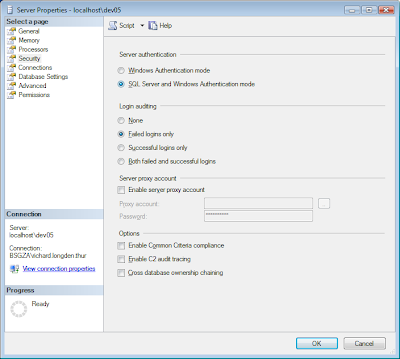
Finally, restart the database engine's service. The easiest way to do this is through Control Panel > Admin Tools > Services. Click on SQL Server (Instance Name) and restart the service. You should then be able to login to the server with the sa account without a problem.
Error: Login failed for user 'sa'. (Without any other message)
Check that:
I logged in with Windows authentication and dropped the database that was set as the default database for this authentication. I also forgot the sa account's password so I couldn't log in with that to change my Windows authentication's default password. That leaves scripts! Using the master database's context, execute the following command (replacing the names where appropriate):
Error: Login failed for user 'sa'. The user is not associated with a trusted SQL Server connection.
This just means that you haven't set the Server to use Mixed Mode authentication. Login using Windows authentication and change your server authentication settings on your server to look like this:

Finally, restart the database engine's service. The easiest way to do this is through Control Panel > Admin Tools > Services. Click on SQL Server (Instance Name) and restart the service. You should then be able to login to the server with the sa account without a problem.
Error: Login failed for user 'sa'. (Without any other message)
Check that:
- - the sa account's password is correct or that it is strong (if enforce password policy is checked)
- - the account is granted permission to connect to the server
- - the account is enabled
- - the account is not locked
I logged in with Windows authentication and dropped the database that was set as the default database for this authentication. I also forgot the sa account's password so I couldn't log in with that to change my Windows authentication's default password. That leaves scripts! Using the master database's context, execute the following command (replacing the names where appropriate):
ALTER LOGIN [user.name] WITH DEFAULT_DATABASE = masterA little special Olympics, but I managed to do this. Or perhaps that just says something about me...
Subscribe to:
Posts (Atom)

