skip to main |
skip to sidebar
I didn't think I'd talk so much about Sql Server features, but I'm stuck on that topic at the moment because of a current project. Nonetheless, I'm sure countless people need help with such things.
I was attempting to script out a blank database, so that I could get the delete order of the many tables correctly. SqlPubWiz is great in that it does this all for you, by putting the tables in the correct delete sequence based on foreign key constraints. Certainly not something you'd want to do in your spare time!
Anyway, I kept getting the following error:
Timeout expired. The timeout period elapsed prior to obtaining a connection form the pool. This may have occured because all pooled connections were in use and max pool size was reached.
Sorry? I've been in the pool too long and I'm pruning? All that's going on is that it's unhappy that you don't have any data in tables. Simple as that. It doesn't like the empty tables. But when you take a look at your output script, you'll see that it has nicely added the delete portion in the right order.
Resolution: Another error message fail.
No apologies for my thinly disguised reference to DLL hell in the post title, I think everyone dealing with SQL Server has at one point dealt with login issues (e.g. two colleagues today, hence the post). If you're like me, you'll see these issues again and again and each time you'll have to Google them to remind yourself how to solve them. I'll add to this list over time but for now, here's a couple of regulars:
Error: Login failed for user 'sa'. The user is not associated with a trusted SQL Server connection.
This just means that you haven't set the Server to use Mixed Mode authentication. Login using Windows authentication and change your server authentication settings on your server to look like this:
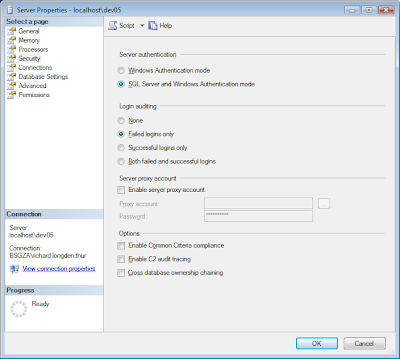
Finally, restart the database engine's service. The easiest way to do this is through Control Panel > Admin Tools > Services. Click on SQL Server (Instance Name) and restart the service. You should then be able to login to the server with the sa account without a problem.
Error: Login failed for user 'sa'. (Without any other message)
Check that:
- - the sa account's password is correct or that it is strong (if enforce password policy is checked)
- - the account is granted permission to connect to the server
- - the account is enabled
- - the account is not locked
Error: Cannot open user default database. Login failed. Login failed for user 'user.name'.
I logged in with Windows authentication and dropped the database that was set as the default database for this authentication. I also forgot the sa account's password so I couldn't log in with that to change my Windows authentication's default password. That leaves scripts! Using the master database's context, execute the following command (replacing the names where appropriate):
ALTER LOGIN [user.name] WITH DEFAULT_DATABASE = master
A little special Olympics, but I managed to do this. Or perhaps that just says something about me...
Here's a few pointers that'll make your life with SQL Server Integration Services (SSIS) a bit easier:
Set your database table fields to Unicode character types
If your data sources come from MS Excel and Access, and you're not using Unicode character types, you'll need to include the Data Conversion data flow task. It's pure grunt work that you'll need to include for each table you're migrating, and it can be easily avoided.
Avoid repository conflicts by working on separate packages and merging later
Using SVN, this has been a nightmare. Sometimes your packages merge perfectly, other times you have many lines of conflict that are just not worth the effort of resolving. It's easier in that situation to copy and paste the work you've created to another package, delete the file and get it back from SVN again, re-add your files and commit.
As a temporary stop measure work on separate packages, within the same solution, from your colleagues and designate one person to look after a "main" package (essentially manually merging your work). This also prevents an irate colleague from walking over to your desk several times a day when you keep breaking their connection strings and giving them gifts of 29 errors and 209 warnings that they can only resolve through re-establishing the connections in the each of the data flow tasks.
Only use a SQL Server Destination if your packages are going to run on a local server
Use an OLE DB Destination if your SQL Server instance is located on a remote server. An issue with this is that you don't get all the functionality associated with SQL Server Destination (and, most importantly, the speed!). A quick MSDN lookup will show you that this is in fact a feature, not a bug! Such is life...
Data migration is a nightmare. You never have enough time for it, and the source of the data always looks like this:

And I've got that expression on too. You're likely to encounter this situation at some point, unless you have the luck of writing a brand new system that just requires basic master data (where do I sign up?!).
I've been happily impressed though, with SQL Server Integration Services (SSIS). It's commonly used to do basic mapping and importing of data from Excel from within SQL Server, however using Business Intelligence Studio, you can create some powerful data migration packages by using a workflow of data transformation tasks. Very 5th generation, says a colleague. I'm not going to give a huge breakdown, as that is more effectively given by the SSIS project on CodePlex, but here's a basic example of a data flow task:

The greater Control Flow can contain many data flow tasks as well as other tasks (eg Bulk Inserts, Execute SQL, FTP Tasks, Sending Mail and many more). The data flow is probably the most complex, as this is where your specific data transformations occur. In the screenshot, you see that we read from a source destination (in this case an MS Access database), from which we do some data conversions, followed by a lookup of another field based on one in the source database (think of it like a VLOOKUP in Excel), creating a derived column, perhaps a calculation, and then inserting the transformed data into our SQL Server destination. Of course, you need to set up all of these by double clicking on the individual tasks and performing some MacGuyver tricks but you're hopefully getting the idea of how useful this tool is.
The key is that these packages are reusable. I've spent some many hours massaging the same data for different time periods in separate Excel spreadsheets. One of these packages could've got my public holidays back!
Testing the packages
While the proverbial jury may still be out on unit testing, I've personally found it invaluable in projects. Not as much during initial development, but its usefulness becomes reallyclear during support.
Now I've recently come across the ssisUnit project on CodePlex. This uses the familiar ~unit test format - setup, test, teardown (with setup and teardown used to create and remove test data, respectively) - using XML. I'm busy playing around with this and will post my thoughts up in the next week.
Now, providing a business case for the additional effort required to include any type of unit testing an a project is a whole other story...


_507.png)